Testing Modbus code without a PLC
How to test a Modbus poller in pytest and CI against simulated devices that ramp, trip, time out and answer busy, instead of a static register table.
Most Modbus code is tested in one of two ways: against the real device on the desk, or not at all. The device on the desk is always healthy. It answers every request, it never trips, and its registers hold whatever you wrote last week. So the code that ships has never seen the things that break Modbus integrations in the field.
This article shows a cheap third way: run simulated devices next to your test suite, make them misbehave on purpose, and run the whole thing in CI.
What actually breaks
From years of repairing and testing industrial PCs, the failures that reach the customer are rarely “the register map was wrong”. They are:
- Behaviour. A drive only reports a speed after a control word and a ramp. An energy counter must rise. Code that only ever saw static registers has never been tested against a value that changes between two reads.
- Classic pitfalls. 32-bit values in a different word order (ABCD, CDAB, …), integers scaled by 0.1 or 0.01, gaps in the register map that answer exception 02, and “40001” in the manual meaning protocol address 0.
- Failures. A device that does not answer, answers late, answers busy, or trips. This is where pollers hang, crash or show stale values as if they were live.
A register table in a free simulator covers the first bullet’s map, but none of the behaviour and none of the failures.
A simulator that behaves
modbus-sim is an open-source Python package I wrote for exactly this. Its devices have models behind the registers: a frequency converter that ramps, a temperature controller that heats towards its set point, an energy meter whose counters count. Three profiles follow the published register maps of real devices (Eastron SDM630, Omron E5CC, a SunSpec PV inverter). And every device can be told to fail.
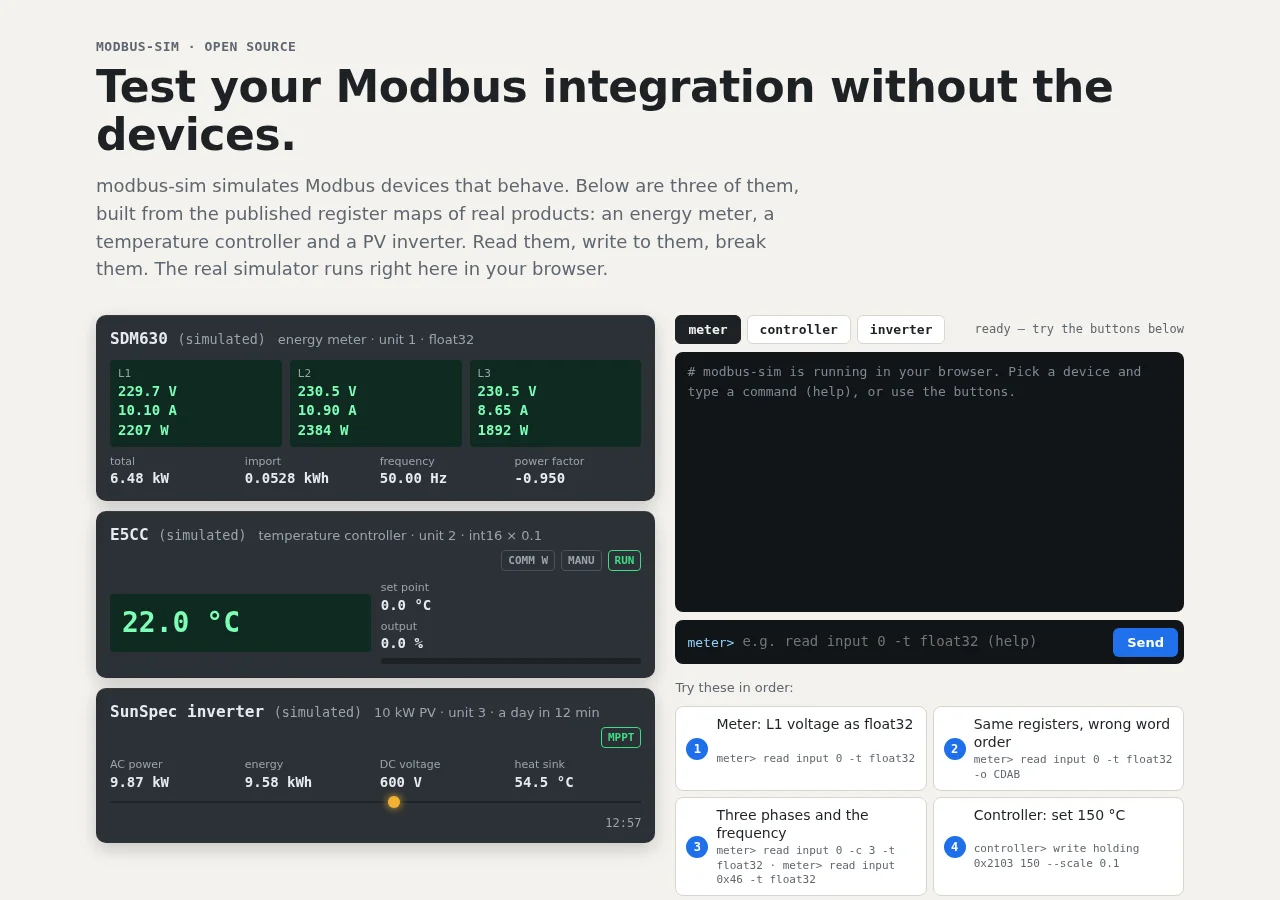
You can try it in your browser without installing anything. Locally:
$ pip install modbus-sim
$ modbus-sim serve vfd &
$ modbus-sim write holding 1 3000 -u 1          # speed reference 30.00 Hz
$ modbus-sim write holding 0 1 -u 1             # control word: run
$ modbus-sim read holding 101 --scale 0.01 -u 1 # output frequency, still ramping
$ modbus-sim inject 1 trip code=4               # and now the drive trips
The code under test
Here is a small poller of the kind every SCADA link, data logger or dashboard has somewhere. It uses pymodbus 3.x and reads a drive’s status word, output frequency and fault code:
# pump.py
from pymodbus.client import ModbusTcpClient
from pymodbus.exceptions import ModbusException

STATUS, FREQUENCY, FAULT = 100, 101, 105   # holding registers of the drive


def pump_status(client: ModbusTcpClient, unit: int) -> str:
    """What the dashboard shows for one pump."""
    try:
        rr = client.read_holding_registers(STATUS, count=2, device_id=unit)
    except ModbusException:
        return "offline"
    if rr.isError():
        return f"error (exception {rr.exception_code})"
    status, frequency = rr.registers
    if status & 0b1000:                     # bit 3: fault
        fault = client.read_holding_registers(FAULT, count=1, device_id=unit)
        return f"fault {fault.registers[0]}"
    if status & 0b0010:                     # bit 1: running
        return f"running at {frequency / 100:.1f} Hz"
    return "stopped"
Four outcomes, and against a healthy device on the desk you only ever see two of them.
The tests
Installing modbus-sim registers a pytest plugin. The modbus_bench_factory
fixture starts simulated devices on a free port for each test and stops them
afterwards, so there is nothing to set up by hand:
# test_pump.py
import time

import pytest
from pymodbus.client import ModbusTcpClient

from pump import pump_status

PUMP = 3


@pytest.fixture
def bench(modbus_bench_factory):
    # One drive at unit 3; time_scale=50 makes a 5 s ramp take 0.1 s.
    return modbus_bench_factory({"devices": [
        {"profile": "vfd", "unit": PUMP, "name": "pump",
         "model_params": {"time_scale": 50}}]})


@pytest.fixture
def client(bench):
    c = ModbusTcpClient("127.0.0.1", port=bench.port, timeout=0.5, retries=0)
    c.connect()
    yield c
    c.close()


def wait_for(condition, timeout=5.0):
    """Poll instead of sleeping a fixed time: fast locally, patient on a slow CI runner."""
    deadline = time.monotonic() + timeout
    while time.monotonic() < deadline:
        if condition():
            return
        time.sleep(0.02)
    raise AssertionError("condition not met in time")


def test_reports_stopped(client):
    assert pump_status(client, PUMP) == "stopped"


def test_reports_running_after_the_ramp(client):
    client.write_register(1, 3000, device_id=PUMP)   # speed reference 30.00 Hz
    client.write_register(0, 1, device_id=PUMP)      # control word: run
    wait_for(lambda: pump_status(client, PUMP) == "running at 30.0 Hz")


def test_reports_a_trip(bench, client):
    bench.inject("pump", "trip", code=4)
    assert pump_status(client, PUMP) == "fault 4"


def test_survives_a_silent_device(bench, client):
    bench.inject("pump", "no_response")
    assert pump_status(client, PUMP) == "offline"


def test_survives_a_busy_device(bench, client):
    bench.inject("pump", "busy")
    assert pump_status(client, PUMP) == "error (exception 6)"
$ pytest -q
.....                                                        [100%]
5 passed in 1.06s
Three details are worth copying even if you never use this simulator:
time_scalespeeds the device model up. A ramp that takes five seconds on the real drive takes a tenth of a second in the test, so behaviour tests stay fast.wait_forinstead oftime.sleep. A fixed sleep is either too long locally or too short on a busy CI runner. Polling with a deadline ontime.monotonic()is both fast and robust.retries=0and a short timeout in the test client. Otherwise the “silent device” test waits through pymodbus’ default retries, and a test that takes seconds to prove a timeout soon gets skipped.
The word-order trap, in four lines
The simulated energy meter stores float32 values in CDAB word order, like many real meters. Read the same two registers both ways:
regs = client.read_input_registers(0, count=2, device_id=1).registers   # L1 voltage
client.convert_from_registers(regs, client.DATATYPE.FLOAT32)                      # 2.66e-11
client.convert_from_registers(regs, client.DATATYPE.FLOAT32, word_order="little")  # 230.2
The wrong word order does not raise an error. It returns a valid, absurd number. A test with a simulated meter catches it on day one; the customer catches it when the dashboard shows 0 V.
In CI
Because the pytest plugin starts the devices itself, CI needs nothing beyond the packages:
# .github/workflows/test.yml
name: test
on: [push, pull_request]
permissions:
  contents: read
jobs:
  test:
    runs-on: ubuntu-latest
    steps:
      - uses: actions/checkout@v7
      - uses: actions/setup-python@v7
        with:
          python-version: "3.12"
      - run: pip install modbus-sim pymodbus pytest
      - run: pytest -q
If the code under test is not Python (Node-RED, a C# gateway, a PLC runtime
in a container), the same devices run as a Docker image,
ghcr.io/steitec/modbus-sim, also as a service container in GitHub Actions.
Faults are then injected over a small JSON control channel; the
README has the details.
Limits
A simulator does not replace the commissioning test on the real device. The models are plausible, not physically exact; the real-device profiles follow the published register maps, not every quirk of every firmware version; and modbus-sim is not a conformance-tested Modbus implementation. What it does replace is the hope that the code will cope with a device that trips, goes silent or answers busy. That you can now test on every commit.